Mastering Automation with Zapier: An Essential Workflow Guide
By Talent Navigator
Published Mar 17, 2025
4 min read
Automation is transforming the way we work by saving time and increasing efficiency. Among the myriad of automation tools available today, Zapier is a standout choice for individuals and businesses looking to streamline their workflows. In this detailed guide, we will explore how to leverage Zapier’s automation capabilities through a practical workflow that connects Google Sheets, Google Drive, and Instagram, allowing you to automate your social media posting seamlessly.
What is Zapier?
Zapier is an online automation tool that connects your favorite apps and services to help you accomplish tasks that normally would require manual input. By utilizing Zaps, automations that consist of a trigger and action, you can eliminate repetitive tasks, freeing up your time for more valuable activities. The beauty of Zapier lies in its flexibility; you can design automations to fit your particular needs.
Overview of Our Automation Workflow
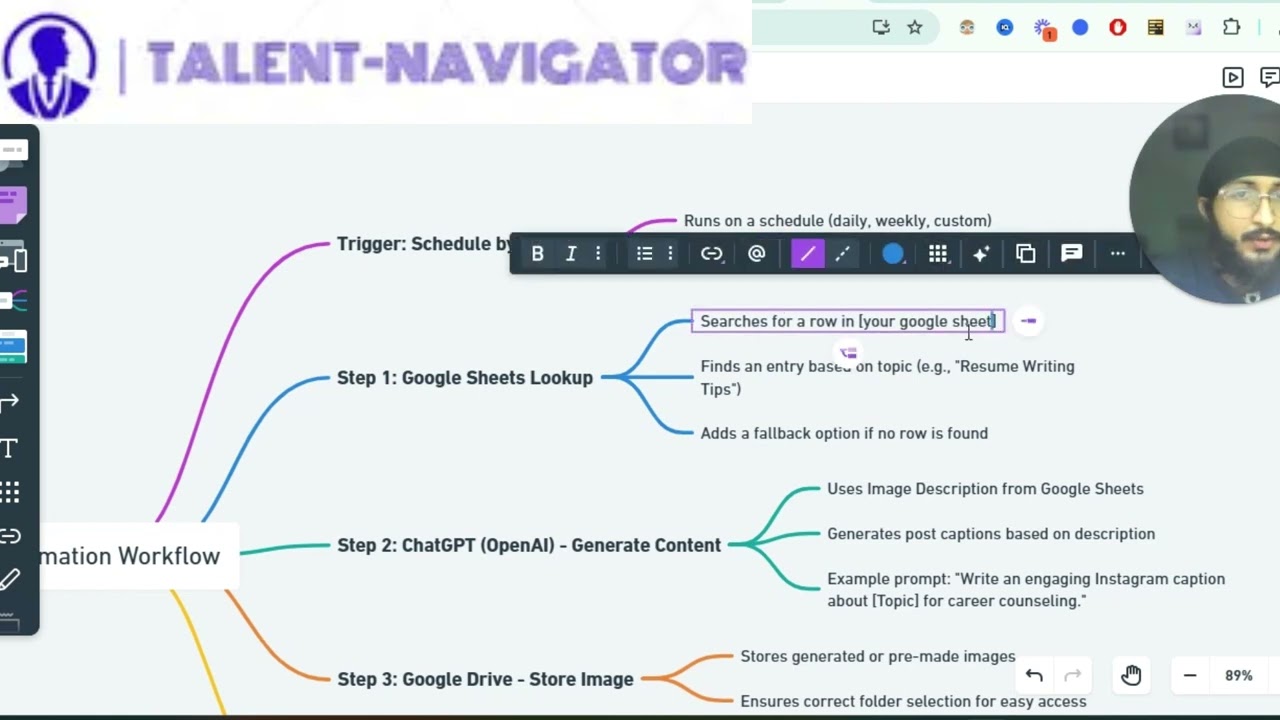
In this guide, we will be creating a Zap that functions as a content generator and automates the process of posting to Instagram. The automation we will develop can be broken down into the following steps:
- Trigger: Scheduled trigger from Zapier.
- Data Entry: Searching for data in Google Sheets.
- Content Generation: Creating captions based on the provided content.
- Image Storage: Storing images generated in Google Drive.
- Social Media Posting: Automatically posting on Instagram.
Step 1: Setting Up the Trigger
The first step to creating our automation is to set up a trigger. In this case, we will use the Schedule by Zapier app. This step involves the following:
- Choose a frequency for the trigger: daily, weekly, monthly, or a custom schedule.
- Specify the timing to ensure that your automation runs when you need it.
Step 2: Data Entry from Google Sheets
Once our trigger is established, the next step is to integrate Google Sheets:
- Search for a specific row in a designated spreadsheet, termed the access sheet in this context. This document will contain the topics from which we will derive content.
- If an entry for the designated topic is found, we proceed to the next step. If not, the workflow should be structured to handle this case gracefully (e.g., by sending a notification).
Step 3: Generating Content
After finding the relevant topic in Google Sheets, we move to the content generation phase:
- Use the image description pulled from Google Sheets to create a compelling caption for Instagram.
- You can prompt the AI by entering a line like "write an engaging Instagram caption" into the prompt box to generate creative copy based on the description.
Step 4: Storing Images in Google Drive
Storing your images is crucial for easy access and organized content management:
- Configure a Google Drive action that stores the generated images in a specified folder.
- Make sure to select the correct folder to facilitate quick retrieval and streamline the workflow further.
Step 5: Posting on Instagram
The final step involves utilizing the Instagram for Business app to post the generated content. This step includes:
- Automatically posting the image and caption generated in the previous steps.
- Verifying that your business account is properly connected and that you are adhering to the platform's requirements in terms of image format and caption length.
Visualizing the Workflow
A visual representation of this intricate workflow helps in understanding how each component interacts. It’s highly recommended to create a flow diagram that outlines the various steps involved.
To assist users, I’ll include a link to an illustrated diagram below, which captures the essence of the automation process for better understanding.
Benefits of Automating Workflows with Zapier
The use of Zapier for automating social media posting illustrates its robust capabilities. Here are several benefits of implementing such workflows:
- Efficiency: Automate repetitive tasks to minimize time spent on mundane activities, allowing more focus on content strategy and engagement.
- Consistency: Ensure that content is posted regularly without the risk of human oversight or delays.
- Scalability: As your business grows, automation workflows can be adjusted and expanded without a complete overhaul, ensuring sustainable growth.
Conclusion
Automation tools like Zapier have the power to redefine how businesses operate by integrating various functions into a streamlined workflow. By following the steps outlined in this article, you can master the art of automation to enhance your productivity.
Ready to simplify your business processes? Start experimenting with Zapier today and discover the endless possibilities!


Comments
Post a Comment